

我们的照片符合国际政府标准。
拍摄技巧
使用浅色、无图案的纯色墙面,身后不要有家具或其他人。

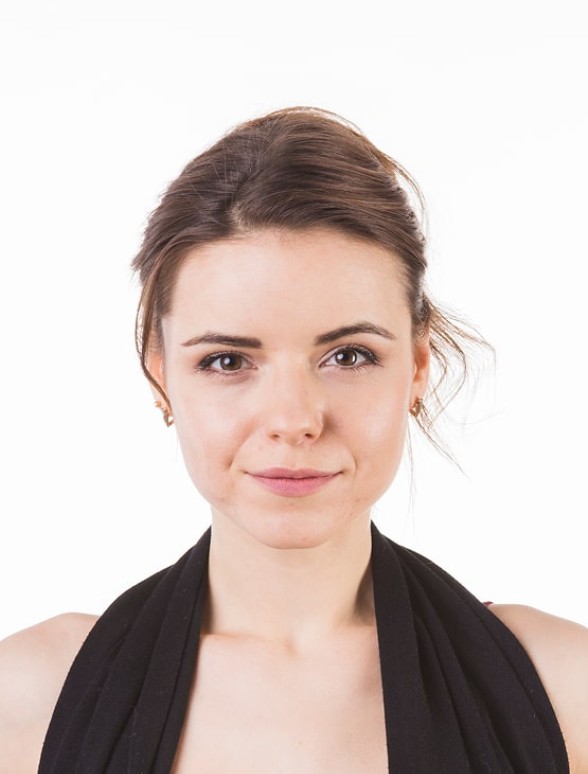
通过


不通过

用户反馈
So quick and easy to use!
I uploaded a selfie from my phone and had a perfect passport photo in minutes. Way better than going to a photo booth. I needed a biometric photo for my passport renewal and decided to give idphotoby.ai a try instead of going to a studio.

Tyrone Kassulke
Fast, user-friendly, and reliable
It fixed the background, lighting, and even checked the official requirements. My photo was approved without any issues!

Arlene Kemmer
Professional-quality photos
I used idphotoby.ai for my child’s passport photo, which is usually a nightmare to get right. With this tool, I just uploaded a picture from my phone, and the software handled everything — The final image looked like it came from a studio.

Armando Deckow
Great service and results
I had a small issue with the background color not being accepted by my local ID office. The second version was accepted with no issues. It's rare to find this level of responsiveness and professionalism from an online tool.

Sherman Watsica
Fast, user-friendly, and reliable
It fixed the background, lighting, and even checked the official requirements. My photo was approved without any issues!
Arlene Kemmer
您对我们的服务满意吗?
请告诉我们我们的表现如何。
我们随时欢迎客户反馈。
